

Interactive 3D & AR product viewer
SoftIcon Model Viewer
Let people see your product from every side, and then in their own room. Drop a GLB or glTF file into the 3D Model Viewer block and visitors can rotate it, zoom in and place it in their space with augmented reality.
Free
on WordPress.org
AR
in the visitor’s own room
v1.3.1
latest version
Docs
guides and FAQ

What it does
Rotate and zoom
Visitors turn the model and zoom into every detail. It can also turn slowly on its own.
View in your room
Augmented reality on phones and tablets: Android Scene Viewer, iPhone and iPad Quick Look, and WebXR.
Hotspots
Click on the model to add numbered points with a label and text. They turn with the model.
WooCommerce products
A 3D model tab on the product screen and a View in 3D button under the product images.
Fast pages
The viewer loads only on pages that use it, and the model is lazy-loaded.
Everything free
Augmented reality, posters, lighting and every other setting are included.
Why 3D Model Viewer
A better way to do it
What changes when you use SoftIcon 3D Model Viewer.
The usual way
Flat photos cannot show every side of a product
Showing 3D usually means custom code
Visitors cannot see the product in their own space
Settings are spread across tools
Recommended
The 3D Model Viewer way
Visitors rotate and zoom the real model
Add a 3D model with a block, no code
AR on phones places the product in the visitor’s room
Height, lighting, shadow and camera in the editor
Tour
See how it works
A quick look at the plugin on the page and in the editor.
01
3D that visitors can touch
A copper lamp in the 3D Model Viewer block on the front end, with a gradient background and rounded corners. Visitors drag to rotate it and scroll to zoom.

02
Set it up in the block
The block in the editor, with the Model and Interaction settings.
03
Fine-tune the look
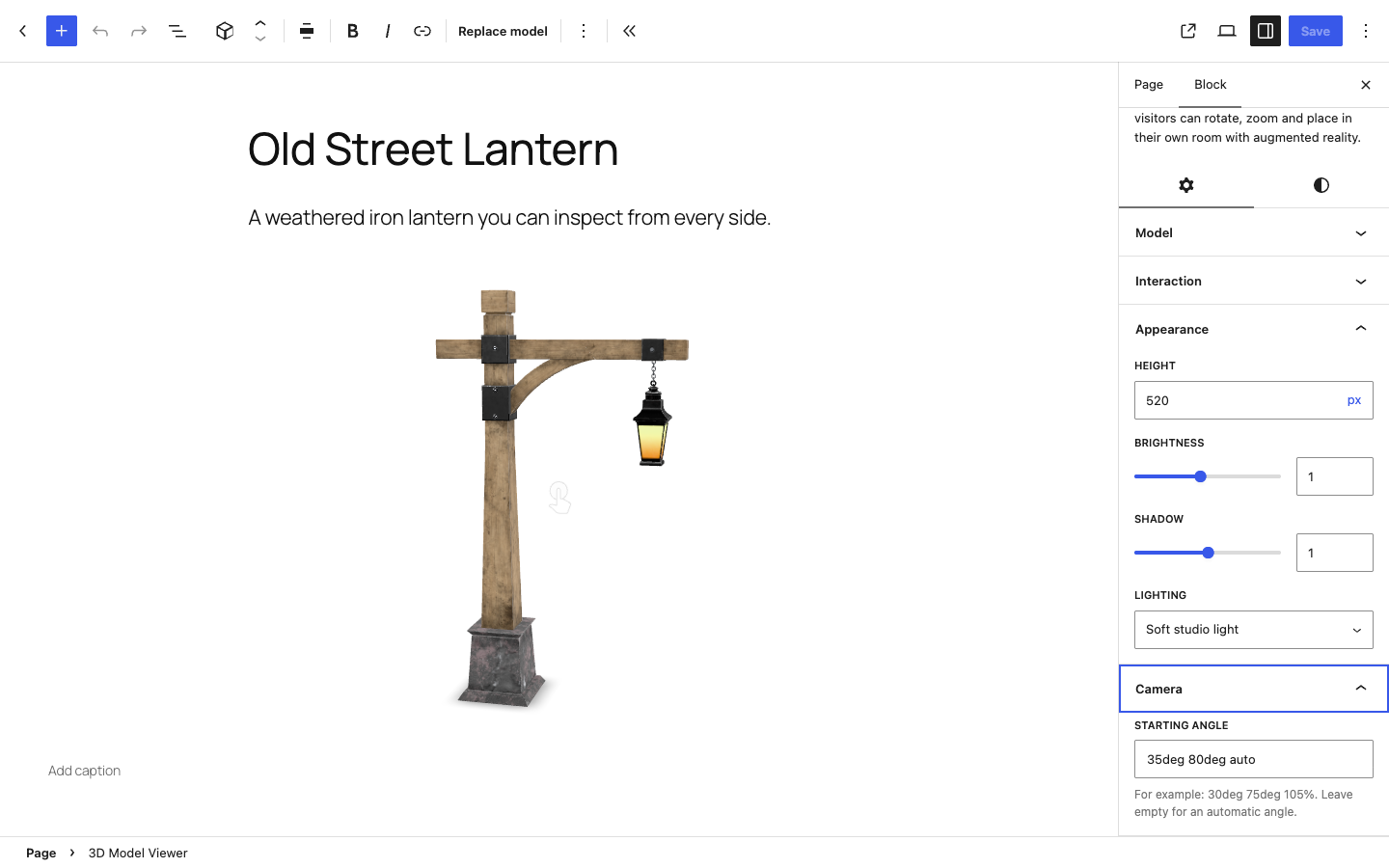
The Appearance and Camera settings: height, brightness, shadow, lighting and starting angle.
Screenshots
Explore the interface
The plugin on the page and in the editor, as it really looks.
Video tutorials
Watch it in action
Short videos, made by the people who build the plugin.
3D & AR product viewer
Add 3D models & AR to WooCommerce
Learning materials
Learn 3D Model Viewer in minutes
Step-by-step docs, a FAQ and short video tutorials, written by the people who build the plugin.

And there is more
Also in the free plugin:
- Upload a GLB or glTF file, pick one from the media library or add one from a URL
- Alternative text and an optional poster image while the model loads
- Height, brightness, shadow strength and two lighting styles
- Starting camera angle
- Your own text for the AR button
- Caption, wide and full width
- No cookies and no external service on your pages
Get it free from WordPress.org
Install it from your dashboard: Plugins → Add New → search “SoftIcon Model Viewer”. Questions? See the FAQ or ask in the support forum.